Author: Andrew
There are some people out there apparently so smart they think they can do things better than the programmers at Microsoft. These hacks irresponsibly recommend ripping out components of Windows to make 'lighter' versions with absolutely no clue as to the consequences of their actions. They mislead others and cause untold amounts of headaches for support staff of PC and software vendors. I've been dealing with end user support for a very long time and have consistently found the most obscure problems to be user induced. Whether the end user mindlessly overclocked, applied useless mythical 'tweaks' or the current trend of irresponsibly and dangerously ripping out core components of their operating system you can be sure of who will be blamed first when there is a problem, Microsoft.
Microsoft programmers believe it or not include the files they do for a reason. The components they recognize as safe to remove can be done so through the add or remove programs option in the control panel. The rest should not be removed unless you can verify with the programmer who added it that it is safe to remove on your system. These 'hacks' who recommend these 'light' builds or ripping out core components have done no such thing. They have no idea what applications, components or features of Windows require which files let alone third parties. They have no idea of the full consequences of removing component 'X'. If they claim they do they are either fools or lying. When you install an application, game or device you need to realize that they were tested only on standard installs and may require files to be present that you are completely unaware of. This can lead to the application, game or device to not work, generate an error or crash. Removing a critical system file or component can lead to system instability, errors or even worse, data loss.
Software Bloat
Window is designed to be everything to everybody and thus includes various components and applications you may not use. This inevitably leads to some perceived 'bloat' but the problem is this can only properly be rectified by Microsoft programmers not the online community of hacks. What may seem as 'bloat' to one person is a necessary application, compatibility fix or driver to another. Many files are present for backwards compatibility with poorly written applications that Microsoft has gone out of their way to ensure works, short of rewriting the old application themselves. In the end Microsoft has learned that it is better for something to work out of the box than deal with the support issues of it not.
How many files or registry entries you have or Window's Services running does not effect your general system performance. These Myths are widely misunderstood by the ignorant hacks who spread them:
"Deleting files does not improve application, gaming or system performance. All it does is increase your available disk space. While AntiVirus and AntiSpyware scan times and general disk search times can be reduced, these are not what people associate with improved performance."
"A few hundred kilobytes of unused keys and values causes no noticeable performance impact on system operation. Even if the registry was massively bloated there would be little impact on the performance of anything other than exhaustive searches."
"Disabling other unnecessary services in general has only one affect on performance and that is reduced Windows XP boot times."
Trail and Error
This is used by people who have little knowledge in the problem area and are essentially guessing. In the computer field this is a poor substitute for Researching and an absolute waste of time. Everything in your computer from the hardware to software has already been created by someone and there is someone who knows how it works. With Windows this is Microsoft. Trial and error makes no attempt to discover why a solution works, merely that it is a solution (sometimes not) but not all solutions, and certainly not the best solution. This is what makes using Trial and Error useless with computer software. Hacks who rely on this method have a poor understanding of computers, logical devices in general and lack proper researching skills. I have been doing this for well over 15 years and extensively research and learn how something works before assuming how it works or irresponsibly guessing. I have read many books, attended many seminars, courses and know where to reference the information I need. "Trial and Error" Techs, Administrators and End Users are worthless and have no business giving advice to anyone else. These hacks are the equivalent of a car mechanic who rips out the "useless" radiator to save on "weight". Hey but the car still seems to run!
nLite
nLite is a powerful free program that can be useful for service pack integration, unattended setups and driver integration. I have used it extensively and it works fine for these tasks. However this program also allows unknowledgeable users to carelessly rip out components of Windows, all the while thinking they are improving performance by reducing the install size without any fully documented, reproduceable and verifiable proof of any performance gains. Least of all anyway to guarantee system stability, application compatibility and error free operation due to their actions. The latter is impossible by all but the Microsoft programmers who put the files there to begin with.
Until Microsoft fully documents each and every reason for being, interaction, association and dependency of each file and registry value for Windows in depth, ripping apart Windows will continue to be a fools errand. One that no sane person should ever attempt.
Monday, June 04, 2007
Irresponsibly Ripping Apart Windows
Posted by
Andrew
at
9:30 AM
17
comments
Links to this post
Thursday, March 15, 2007
Diskeeper Foolishly Adds Product Activation
Author: Andrew
With the latest release of Diskeeper 2007 Build 11.0.701 the company formerly known as Executive Software now simply just Diskeeper Corp. has added some "enhancements" to the latest build of their disk defragmenter software:
1. This product always requires Product Activation upon install.Since when is intrusive, privacy invading, product activation an "enhancement"? It's not, product activation is simply a way to annoy legitimate clients. The lawful consumer should not be punished for someone else's unlawful actions. The only reason Microsoft has been able to get away with using activation is due to the lack of a true competitor who can actually take market share away from them on the OS front. With disk defragmenter software Diskeeper apparently thinks they are the only company in the game. Unfortunately for them their competitors will be laughing all the way to the bank:
2. Silent Activation is enabled which will automatically activate when an internet connection is found.
This build is available via Check for Updates if you are running Vista. Due to the fact that this build requires activation (and you may not have had to do this in the past) it is not yet available via Check for Updates for XP/2000 users, though will be in the near future.
PerfectDisk
O&O Defrag
When Intuit made this blunder a few years ago by adding product activation to TurboTax they lost massive market share to competitors like H&R Block's TaxCut. I personally stopped using TurboTax and will never go back. I also easily convinced everyone I knew to stop using their software. Considering Windows Vista now includes an automatic defragmenter for free this is a foolish move on Diskeeper's part. Once people know about it they will vote with their wallets.
Posted by
Andrew
at
7:00 AM
1 comments
Links to this post
Labels: Software
Wednesday, February 07, 2007
Ad-Aware false positives are get ridiculous
Author: Andrew
Dealing with Adware, Spyware and Malware is part of the job if you work in IT. There are various free utilities available to deal with the problem. Ad-aware is one of the many I personally use and recommend. Recently in what I can only describe as desperation to strum up more business, Lavasoft has recently been including detection of various non-malicious utilities as CRITICAL OBJECTS that need to be removed. This is blatantly irresponsible. Forget the fact that they continue to include non-malicious cookies as critical objects as well. They are now needlessly panicking many users who have completely clean machines with these false positives:
Since when did the Magic Jelly Bean Keyfinder defined as "a freeware utility that retrieves your Product Key (cd key) used to install windows from your registry" become a Win32.Generic32.PWS defined as "software that records your keystrokes and passwords, trasmitting them to a remote server". Huh? Did Lavasoft start hiring amateurs to write their definition files?
Since when did the Event ID 4226 Patcher defined as "a utility that removes the 10 half-open connection TCP/IP limit imposed by Windows XP SP2" become a Win32.Hacktool.Tool.EVID defined as "a tool that allows to change the amount of simultanious half-open connections allowed by XP. Could potentially harm the system and even result in boot failure". Harm the system and Boot failure? Are you kidding me? How does changing this limit prevent Windows XP from booting? How can this utility "Harm your system"? This is beyond ridiculous and is now blatantly irresponsible and dangerous misinformation. I have tried unsuccessfully to report these blatant false positives with no success.
Lavasoft needs to get their act together. I realize they are desperate to sell the unnecessary pro version of their software. But including harmless utilities as dangerous CRITICAL OBJECTS that either are being used to or can cause harm to your system instead of improving their actual detection of harmful malware is disreputable. Especially when competing Anti-Spyware utilities exist for free such as Spybot Search & Destroy, Windows Defender and AVG Anti-Spyware. Though I suspect it has more to do with lack of quality control on their definition files than anything else.
Posted by
Andrew
at
7:00 AM
0
comments
Links to this post
Labels: Software
Sunday, January 14, 2007
Windows XP More Secure than Linux
Author: Andrew
Anyone who tracks security vulnerability reports knows of the ridiculous amount that reference holes in Linux. For whatever reason this is never talked about and Linux gets this magic aura of invulnerability. Part of the confusion lies with the complexity of the open source Linux model that separates Linux "Distributions" from Linux "Kernel" vulnerabilities. Now if you start looking into and adding up Linux "Distribution" vulnerabilities that can take you into the hundreds upon hundreds of security holes that are never talked about. To simplify things I took the latest Linux Kernel v2.6.x and compared it to Windows XP. This is more than a fair comparison for the shocking results to follow.
As with Firefox, Linux vulnerabilities are frequently lumped together in single advisories misleading the true vulnerability count:
Windows XP -170 Advisories = 213 Vulnerabilities.
Linux Kernel v2.6.x - 108 Advisories = 231 Vulnerabilities.
Even with open source advocates finally admitting that Linux is insecure they still try to claim it is more secure than Windows. Too bad this is now proven to be another myth.
Windows XP is more secure than Linux and sexier ;)
Posted by
Andrew
at
9:42 AM
38
comments
Links to this post
Labels: Linux, Open Source, Software, Windows
Tuesday, October 31, 2006
Firefox Admits only 0.18% using Firefox 2.0
Author: Andrew
Over the last year we have been bombarded with all sorts of overhyped figures of browser market share. With the latest release of Firefox 2.0 they are now claiming 2 million downloads in 24 hours.
Wow that sounds great until you do the math and realize that is only 0.18% of worldwide Internet users.
World Internet Usage: 1,086,250,903
Firefox 2 Downloads: 2,000,000
Worldwide Percentage Using Firefox 2.0 = 0.18%
Posted by
Andrew
at
7:00 AM
9
comments
Links to this post
Friday, September 08, 2006
Internet Explorer 6.x More Secure than Firefox 1.x in 2006
Author: Andrew
Is Browser Security getting better? That is tough to say but Firefox is definitely not leading the way. Despite all the hype, despite all the Myths, Firefox 1.x has a worse security record so far in 2006 than Internet Explorer 6.x.
The popular security site Secunia reports advisories that can include multiple security vulnerabilities of a product. The most severe Firefox Secunia advisories tend to get posted at each version update of the browser. These version update advisories mislead someone looking simply at the advisory totals:
Firefox v1.5.09 - 12/19/06 - SA23282 - 12/19/06 - 10 Vulnerabilities
Firefox v1.5.08 - 11/07/06 - SA22722 - 11/08/06 - 5 Vulnerabilities
Firefox v1.5.07 - 09/14/06 - SA21906 - 09/15/06 - 8 Vulnerabilities
Firefox v1.5.05 - 07/27/06 - SA19873 - 07/27/06 - 13 Vulnerabilities
Firefox v1.5.04 - 06/01/06 - SA20376 - 06/02/06 - 10 Vulnerabilities
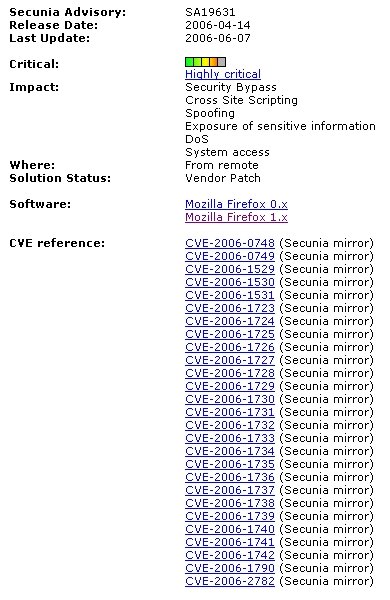
Firefox v1.5.02 - 04/12/06 - SA19631 - 04/13/06 - 27 Vulnerabilities
Firefox v1.5.01 - 2/01/06 - SA18700 - 2/02/06 - 8 Vulnerabilities
Simply looking at the advisories between Firefox 1.x in 2006 and Internet Explorer 6.x in 2006 gives a misleading 10 to 14 advisory "win" for Firefox but once you add up the actual vulnerabilities for each it is clear Internet Explorer 6.x has been the more secure browser so far in 2006:
Firefox 1.x - 13 Advisories = 88 Vulnerabilities
Internet Explorer 6.x - 14 Advisories = 36 Vulnerabilities
Winner:
Internet Explorer 6.x more secure than Firefox in 2006.
Posted by
Andrew
at
7:00 AM
3
comments
Links to this post
Labels: Firefox, Internet Explorer, Software
Sunday, June 18, 2006
ZoneAlarm Internet Security Suite 6.5 Released in BETA State
Author: Andrew
ZoneLabs over the years has offered a very good ZoneAlarm Firewall product but they have not been without their mishaps. Just last year they experienced serious issues with their "True Vector" Engine Crashing. The year before with ZoneAlarm 5 they had a serious bug that prevented CHKDSK from running at bootup in Windows XP (It appears all forum posts relating to this issue have been conveniently deleted). The latest version of the ZoneAlarm Internet Security Suite 6.5 is having massive problems with the AntiSpyware component not updating properly and the Date Modified Attribute not being saved in Windows Explorer. Apparently the ZoneLabs developers felt it was ok to release BETA software as an Official Release. Either that or the person in charge of Quality Control should be fired. Enough is Enough.
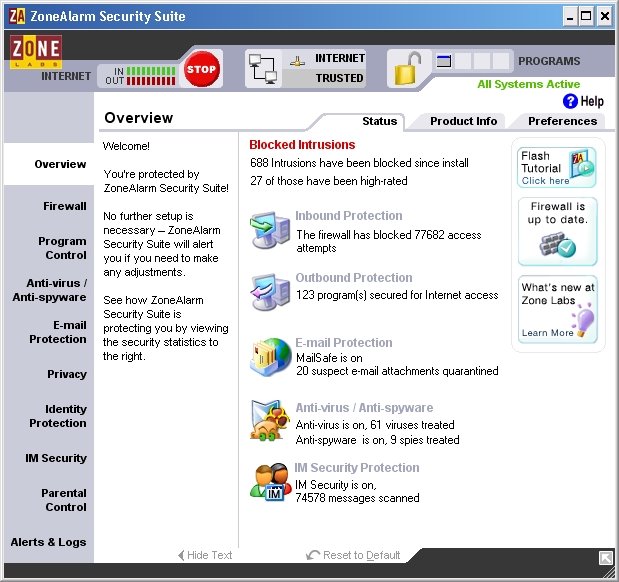
The ZoneAlarm Internet Security Suite is supposed to be the pinnacle of security products. It goes beyond the free and pro versions which are simply a firewall product. The Internet Security Suite adds AntiVirus, AntiSpyware, Identity Theft Protection, Spy Site Blocking, Privacy Protection, Anti-Spam and Anti-Phishing, IM Protection, Email Security, Wireless PC Protection and Parental Control to their award winning Firewall. Too bad it is plagued with serious issues that should have been found in BETA testing.
AntiSpyware Update Problem
The Moderators on the Forums have addressed this problem with this post:
We have determined the cause of these failures. We will be updating the AV startup files from CA in the next release.How do you miss this in testing? The better question is whether this was even tested at all? The following bug leads me to believe no.
In the meantime, the workaround is:
- When you see an AV update failed message, do NOT close that window!
- At the bottom of that window, there or a Retry button. Press it.
- This should update the appropriate file, and you should no longer have any AV update failures.
** UPDATE - There appears to be a problem between the CA and the ZL av servers. We are working to get this fixed ASAP so everyone can get the latest DAT files. Note that use of any UNAPPROVED method of updating that causes problems later on will NOT BE SUPPORTED!
Marcus
Forum-Moderator
Date Modified Problem
This is the most ridiculous bug. Somehow ZoneAlarm is screwing with the Windows File System and preventing the Date Modified attribute from being save properly. This can cause all sorts of serious problems with any software that depends on this basic Windows function to work properly, such as software updates and backups. Why is a Firewall product screwing up the NTFS file system? This is inexcusable.
Solution
The only solution is to uninstall ZoneAlarm Internet Security Suite 6.5 and reinstall the last working version 6.1.744.001. You can always use a competitors product too.
Conclusion
ZoneLabs really needs to reconsider releasing apparent BETA software as an official releases. With a history of serious bugs plaguing their product releases you would think that they would learn by now. I have certainly learned not to take their official releases seriously anymore.
Update
These issues have been resolved in the latest 6.5 version. Though it is not mentioned anywhere in their changelog.
Posted by
Andrew
at
6:00 PM
6
comments
Links to this post
Labels: Software
Sunday, March 12, 2006
Opera 9 Passes the Acid2 Browser Test
Author: Andrew
The latest Opera 9 Technical Preview Windows Build 8265 passes the Acid2 Browser Test!
"Acid2 is a test page, written to help browser vendors ensure proper support for web standards in their products."
Opera 9 TP Windows Build 8265 Acid2 Results:
Considering Firefox (an open source web browser) still has a ways to go here to pass this test, this is a significant win for Opera (a closed source web browser). Once the word gets out that the now completely free Opera; is the fastest, most secure and most compliant web browser in Windows, it's popularity is sure to rise.
Opera Watch covers Opera's recent history in the Acid2 test. Congratulations to the Opera development team. Well done!
Download: Opera v8.53
Download: Opera v9 TP
Posted by
Andrew
at
8:00 AM
3
comments
Links to this post
Tuesday, January 03, 2006
Opera is Faster, More Secure and More Compliant than Firefox
Author: Andrew
With Opera recently releasing their web browser completely free of Ads, it is a good time to let the truth be told. Not only is Opera Faster then Firefox in all performance areas, it is much more Secure and more Compliant.
Performance
Firefox is often mentioned as a light-weight performance browser. It is also touted as being faster than other browsers. This is far from the truth. These tests clearly show Opera outperforming all other Graphical Browsers in Windows. It should be noted that Mozilla and Internet Explorer both outperform Firefox.
Security
Secunia shows Opera 8.x to only have 1 out of 13 vulnerabilities unpatched. While Firefox 1.x has 3 out of 26 vulnerabilities upatched. Clearly Opera is the more Secure Web Browser.
Compliance
The Acid2 Browser Test is a test page, written to help browser vendors ensure proper support for web standards in their products. Althought the Acid2 Browser Test does not test every web standard, it clearly shows that Opera is more compliant with the features considered most important for the future of the web.
Opera v9 Acid2 Browser Test Results
Firefox v1.5 Acid2 Browser Test Results
Conclusion
With the obvious superiority of Opera to Firefox in Speed, Security and Compliance why is it not being recommended as much? That is a good question. Features that people really care about such as integrated Search, Tabs and Pop-up Blocking have been in Opera way before Firefox even existed. The last obstacle of price is no longer one. Opera is now free.
Posted by
Andrew
at
1:00 AM
30
comments
Links to this post
Thursday, December 01, 2005
Firefox Fanboys Regroup to Spam More
Author: Andrew
Guess what time of year it is? Firefox Spam Time! - Video Spam that is. "My Lord, IE still holds Market Dominance!" cries the Fanboy. The Emperor responds, "Yes young Foxer, on my word unleash more Spam!". "Yes my lord, we will commence Spamming.....I mean "Spreading" Firefox.""Firefox 1.5 would be backed by a "big marketing push" that will include a community marketing campaign that will encourage Firefox fans to tell the world about their favorite browser by publishing home-made videos on a Mozilla Web site. You will have real people telling you about Firefox's features, what's cool and great" - Christopher Beard
“I think that you can spend a lot of time buying ads and radio jingles, and you really have to repeat those over and over and pound it into people’s heads. People have defense mechanisms against these commercials. But it's something different when it’s a user standing up and saying genuinely what makes Firefox great for them. So I believe that campaigns like these testimonials are going to be a key piece in the next wave of marketing.” Asa Dotzler - Firefox Spam coordinator.Yes, now that you can see what A Firefox Fanboy actually looks like, people will convert in droves! Brilliant idea if you work for Microsoft and wanted to promote IE, otherwise have mercy on my media player.
Does the world really need more Firefox Spam? Let alone Video Spam? No. Do people with no real life become Firefox Fanboys? The answer undoubtedly is Yes.With all this time gone by and all this effort wasted will any of these Fanboys tell the truth about Firefox? Obviously No, it is all about the Religion.
Downloads
But you will hear plenty about how many people download it! I have already explained why this is very misleading here. If the same people keep downloading it over and over, that does not mean more converted users or even new users. None of which takes into account how many people try it out due to the hype and dump it at the first site that doesn't work right. This happens far more then you think. Not to mention people such as myself download each version so I can review it but I personally don't use it as I run into the same problems with it that I have with Opera, broken sites. Personally I use AvantBrowser since it works with 99.9999% of the Web. A good alternative that has the same compatibility is Maxthon. The reason is both are IE shells. They take the ultimate in website compatibility = IE's engine and put a new shell around it. You get all of Firefox's wiz bang, overhyped features with none of the compatibility problems or slow performance.
Performance
Yes you heard that right SLOW PERFORMANCE. The numbers don't lie. IE is faster in 6 out of 7 of the tests. Opera 8 and 9 are faster in all of them. Firefox loads like a dog. Fanboys conveniently do not tell you this either.
Security
Firefox still has outstanding unpatched vulnerabilities. Fanboy response? "IE has more" and that makes Firefox secure how?
Evangelism
While Tech Evangelists will make you believe, only technically savy people use Firefox or some other BS. This is simply not the case. The far majority of Firefox users I meet use it to be "in" or think they are "in". This is generally the iPod crowd. Their reasons for using it range from lack of basic Windows Knowledge to buying into the hype or some bizarre hatred of Microsoft. It is usually not a coincidence some of these popular evangelists push Apple products. Now really I don't care, Apple makes some decent products. The problem is that it is the Evangelists lack of technical savy that drove them to Firefox in the first place. This is the same with their followers. Again I don't have a problem with that but don't sit there and claim to be technically savy when you can't prevent yourself from getting infected with Spyware.
BTW - "I get no Spyware"
So when you get that latest Firefox Spam Video Mail, think twice about who the person is who is sending it and why. There is a good chance that person knows less about computers then you do.
Discuss in Forums
Posted by
Andrew
at
11:30 PM
8
comments
Links to this post
Wednesday, November 16, 2005
nVidia's not so "Unified" Driver Support
Author: Andrew
This news is six months old but for various reasons is still not widely known. nVidia dropped "Unified" driver support in Windows XP/2000 for certain GPUs (Graphics Processing Units), starting with driver v77.72. This is not the first time they have done this with their "Unified" driver architecture but it is significant in its disparity. The irony is the lack of "Unification".
nVidia Unified Driver Architecture
"The NVIDIA Unified Driver Architecture (UDA) is the foundation for the company's award-winning ForceWare drivers and delivers forward-and-backward compatibility across all implementations of NVIDIA desktop, workstation, mobile, platform, and multimedia processors. With a single driver, UDA delivers ongoing performance and feature improvements, reduced maintenance time, increased scalability, and a lower total cost of ownership.
ForceWare software supports the entire line of TNT2 processors, the GeForce consumer line of GPUs, the NVIDIA nForce platform processors, the NVIDIA Quadro line of professional GPUs, as well as the full line of NVIDIA mobile processors."
This is clearly not the case as you will see below.
Support Dropped
TNT2
TNT2 Pro
TNT2 Ultra
TNT2 Model 64 (M64)
TNT2 Model 64 (M64) Pro
Vanta
Vanta LT
GeForce 256
GeForce DDR
GeForce2 GTS
GeForce2 Pro
GeForce2 Ti
GeForce2 Ultra
GeForce2 MX Integrated graphics
Quadro
Quadro2 Pro
Quadro2 EX
The last driver version to support these is v71.84.
To add to the confusion all the current driver versions including the v8x.xx series still supports the slower GF2 Mx series of GPUs.
Still Supported
GeForce2 MX
GeForce2 MX 100
GeForce2 MX 200
GeForce2 MX 400
The GeForce3 Series and all newer GPUs continue to be supported in all the latest drivers. The GF2 MX series is likely still supported due to their very large install base and market share. These cards at one time were incredibly popular and widely included in new systems. The rationale behind dropping support for aging GPUs has many theories. The one I support is that less supported GPUs improves driver release times by cutting down on QA testing and certification. This allows newer driver revisions to be released quicker without sacrificing reliability and stability. Either way you can throw "Unification" out the window.
The problem is there are no warning signs this is going to happen, it just does, apparently on nVidia's whim. Granted the GPUs dropped are usually dated but still it would be nice to know when to expect this. As for fairness, why should GF2 Ti owners be left out in the cold but the slower MX line still get support? nVidia needs to set a policy based on performance or drop a whole line based on it's naming, such as all the GF2s. Microsoft at least provides you with a Support Lifecycle service to plan around. nVidia needs to provide a similar service.
Conclusion
It is highly recommended that anyone running a non supported GPU should seriously consider upgrading as current driver support is essential for compatibility with newer games. While the GeForce 2 MX series is still supported, performance in almost all of the latest games is unacceptable.
Note: To make this easier for people to understand and follow only driver versions listed on nVidia's site are referenced. No mention of BETA drivers or any other unofficial driver release is taken into account or will be.
Discuss in Forums
Posted by
Andrew
at
3:00 AM
0
comments
Links to this post
Labels: Software
Sunday, November 06, 2005
Firefox FireTune Utility Includes Useless Tweak(s)
Author: Andrew
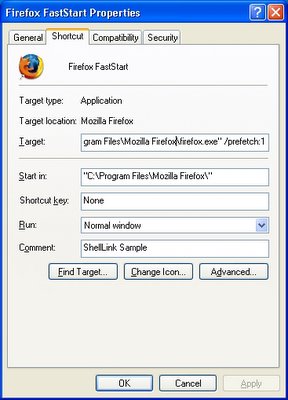
Another day, another program that spreads misinformation. You would think by now people would do five minutes of research before providing others with advice. In this case the FireTune Tweak Utility made by TOTALidea falls for the old /prefetch:1 shortcut myth. FireTune claims to improve Firefox performance using Placebo effect tweaks like this? I wonder how many other useless tweaks are included in this utility?
Ryan Myers of the Microsoft's Windows Client Performance Team has already debunked this Myth months ago. Yet judging by the download numbers at MajorGeeks over 600,000 people have been suckered in, lovely.
Misinformation and the The Prefetch Flag
The /prefetch:# flag is looked at by the OS when we create the process --however, it has one (and only one) purpose. We add the passed number to the hash. Why? WMP is a multipurpose application and may do many different things. The DLLs and code that it touches will be very different when playing a WMV than when playing a DVD, or when ripping a CD, or when listening to a Shoutcast stream, or any of the other things that WMP can do. If we only had one hash for WMP, then the prefetch would only be correct for one such use. Having incorrect prefetch data would not be a fatal error -- it'd just load pages into memory that'd never get used, and then get swapped back out to disk as soon as possible. Still, it's counterproductive. By specifying a /prefetch:# flag with a different number for each "mode" that WMP can do, each mode gets its own separate hash file, and thus we properly prefetch. (This behavior isn't specific to WMP -- it does the same for any app.)
This flag is looked at when we create the first thread in the process, but it is not removed by CreateProcess from the command line, so any app that chokes on unrecognized command line parameters will not work with it. This is why so many people notice that Kazaa and other apps crash or otherwise refuse to start when it's added. Of course, WMP knows that it may be there, and just silently ignores its existence.
I suspect that the "add /prefetch:1 to make rocket go now" urban legend will never die, though. I know that at least one major company ships products with it in their shortcuts, without ever asking us... just for good measure, I guess. :-P All it does is change your hash number -- the OS is doing exactly the same thing it did before, and just saving the prefetch pages to a different file.
To sum it up adding /prefetch:1 does nothing but force Windows to use a different prefetch (.pf) file for prefetching Firefox other then the one it was using. In Windows Media player creating separate prefetch files for each mode makes sense for Firefox it creates a second prefetch file for no reason. This does nothing to improve performance loading Firefox. Now if the makers blindly added this useless tweak in I highly doubt they thoroughly tested and researched all the other changes this utility makes.
This doesn't sound like a big deal until you realize you have over 600,000 people telling everyone about this program and a shortcut tweak that does absolutely nothing. Maybe the makers of the program will learn but I doubt it.
Update December 13, 2005 - Success!
Firetune v1.0.9 removes the useless /prefetch:1 shortcut tweak.
Posted by
Andrew
at
2:00 PM
2
comments
Links to this post
Thursday, November 03, 2005
Block CD/DVD DRM and Rootkits Easily
Author: Andrew
Sony recently showed the extent to which they will go to attempt to copy protect their Music CDs. The latest use of Rootkits in their DRM has gone way too far. I am personally boycotting Sony Products. Stopping these sorts of infections and getting around DRM is much easier then you think. Simply disabling the Windows Autorun feature blocks them from installing cold. Losing the convenience of Autorun is a small price to pay for the peace of mind that your computer will not become the dumping ground for future DRM Viruses and Rootkits that can cripple the ability to use your CD/DVD drive.
Disabling Autorun
For DRM Viruses and Rootkits to install they must be executed. Music CD/DVDs do this by utilizing the built-in Autorun feature of Windows that lets you put a disc in your drive and have it play automatically. This convenient feature also lets the DRM software execute and infect your computer. Simply disabling Autorun blocks the DRM software from executing but allows you to still manually listen to the music. This does require an additional step on your part to open the CD/DVD from your media player but it is much more secure.
Windows XP
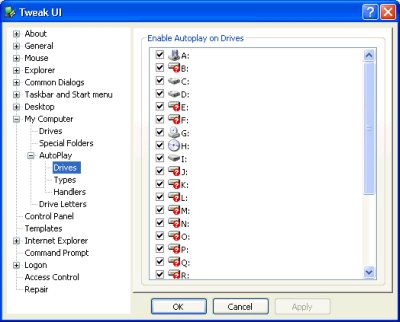
Download Tweak UI XP, install and run. Go to "My Computer", "AutoPlay", "Drives" then uncheck each drive letter for each drive you want AutoPlay disabled on.
Windows 95/98/Me/NT/2000
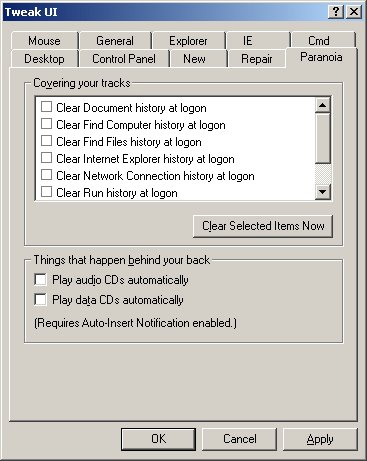
Download Tweak UI v1.33, install and run. Go to the "Paranoia" tab, uncheck "Play audio CDs automatically" and "Play data CDs automatically".
Discuss in Forums
Posted by
Andrew
at
1:00 AM
0
comments
Links to this post
Monday, October 03, 2005
CCleaner Cripples Application Load Times
Author: Andrew
Recently CCleaner has added an internet urban legend as a cleaning option, "Old Prefetch data". Cleaning the Prefetch folder is an internet Myth that simply will not die due to the gross ignorance of many people in regards to how Windows XP Prefetching works. These same people generally recommend other bogus advice such as disabling Windows Prefetching completely and adding /Prefetch:1 to desktop shortcuts.
"Bottom line: You will NOT improve Windows performance by cleaning out the Prefetch folder. You will, in fact, degrade Windows performance by cleaning out the Prefetch folder." - Source
CCleaner for the most part is a good application, it quickly and easily removes temporary and unused files from Windows. It has a nice interface that clearly shows what has been "cleaned". On neglected systems this can free hundreds of Megabytes of harddisk space. Apparently in the authors quest to clean everything and anything, he blindly ignored how Prefetching works.
Prefetching
"When a Windows XP-based system is booted, data is saved about all logical disk read operations. On later boots, this information is used to pre-fetch these files in parallel with other boot operations. During boot and application launch, a Windows system demands and pages a sizable amount of data in small chunks (4K to 64K), seeking between files, directories, and metadata. The Logical Prefetcher, which is new for Windows XP, brings much of this data into the system cache with efficient asynchronous disk I/Os that minimize seeks. During boot, the logical prefetcher finishes most of the disk I/Os that need to be done for starting the system in parallel to device initialization delays, providing faster boot and logon performance.
Logical prefetching is accomplished by tracing frequently accessed pages in supported scenarios and efficiently bringing them into memory when the scenario is launched again. When a supported scenario is started, the transition page faults from mapped files are traced, recording which page of a file is accessed. When the scenario has completed (either the machine has booted or the application started), the trace is picked up by a user-mode maintenance service, the Task Scheduler. The information in the trace is used to update or create a prefetch-instructions file that specifies which pages from which files should be prefetched at the next launch.
The user-mode service determines which pages to prefetch by looking at how successful prefetching has been for that scenario in the past, and which pages were accessed in the last several launches of the scenario. When the scenario is run again, the kernel opens the prefetch instructions file and asynchronously queues paging I/O for all of the frequently accessed pages. The actual disk I/Os are sorted by the disk drivers to go up the disk once to load all pages that are not already in memory. This minimizes seeks, cuts down on disk time, and increases performance. The kernel also prefetches the file system metadata for the scenario, for example, MFT entries and directory files. Because prefetching is useful only when the required data is not in memory, the applications that are launched frequently are not traced and prefetched each time." - Source
Prefetching Facts
1. Prefetching is enabled by default in Windows XP.
2. Prefetching is configured optimally by default.
3. Prefetching will significantly improve application load times.
4. The Prefetch (.pf) files are not a cache, they are reference files.
5. The Prefetch (.pf) files do not preload/cache anything upon Windows startup that does not normally load at startup.
6. Only one Prefetch (.pf) file is referenced during startup = NTOSBOOT-B00DFAAD.PF
7. Only one Prefetch (.pf) file is created per application.
8. The Prefetch (.pf) files including the Layout.ini and NTOSBOOT-B00DFAAD.PF files are automatically updated.
9. The Prefetch folder is auto cleaned after 128 entries have been reached down to the 32 most used applications.
10. Notebooks running on battery power will not execute idle tasks and thus cannot further optimize or remove prefetch files.
What CCleaner does
CCleaner deletes any Prefetch file older then two weeks based on the .pf file's last access date. This is completely idiotic for a number of reasons. First you should never delete a .pf for any installed application. With the .pf file missing, that application will take up to 100% more time to load when you decide to launch it. CCleaner does this to any application you have installed on your computer but have not used in over two weeks. It makes absolutely no sense to delete these files. Why would you deliberately want to slow down any installed application's load time? It will also do this if you have not used you computer for two weeks. Second, it is quite common to disable the NTFS Last Access Time Stamp for performance reasons. I actually recommend doing this since it speeds up the file system. In this case CCleaner will delete any .pf file that was created over two weeks ago. You can clearly see how running CCleaner in this case would wind up deleting ALL your Prefetch files every two weeks. Now you are crippling every application's load time on your system instead of just the ones you have not used in two weeks. Ridiculous!
Testing
Make sure the Task Scheduler service is set to automatic. Launch an application like Firefox three times. Reboot and make sure there is a FIREFOX.EXE-XXXXXXXX.pf file in the C:\WINDOWS\Prefetch folder. If there is, launch Firefox and time it. Then delete the .pf file, reboot, relaunch Firefox and time it again. You will now see Firefox take a significantly longer time to load. Now imagine this on any other application, then imagine doing this deliberately every two weeks? Why? To save a tiny bit of HD space? It makes no sense. 128 .pf files take up maybe 5 MB of disk space.
Conclusion
Do not clean the prefetch folder! If you use CCleaner uncheck the "Old Prefetch data" option. Finally let the makers of CCleaner know they need to remove this option from CCleaner.
References
Windows XP: Kernel Improvements Create a More Robust, Powerful, and Scalable OS - (Mark Russinovich, Ph.D Computer Engineering, Microsoft Technical Fellow)
Misinformation and the The Prefetch Flag - (Ryan Myers, Microsoft Windows Client Performance Team)
One more time: do not clean out your Prefetch folder! - (Ed Bott, Author Windows Inside Out)
Kernel Enhancements for Windows XP - (Microsoft)
Benchmarking on Windows XP - (Microsoft)
Microsoft Windows XP Performance - (Microsoft)
Update, October 4, 2005:
It has been brought to my attention the makers of CCleaner want to cover up and ignore this issue. They do not want to allow a discussion of it because they know they are wrong and cannot win an argument where the facts are against them. They either delete any topics in their forums brought up about the issue, lock them or ban the users who bring it up. I recommend instead to bring this issue up in all forums where they will allow the discussion and you can inform people of how prefetching works and why CCleaner should have the "Old Prefetch data" option removed.
Update, August 12, 2006:
CCleaner v1.32.345 has moved the "Old Prefetch data" option to the advanced section and now it is not selected by default. However there should still be a warning added when you select it. And of course it is still not recommended to use this option for any reason as it is still useless and will do nothing but slow down your system. But at least this is an improvement and should prevent many users from unknowningly slowing there system down everytime they run CCleaner.
Posted by
Andrew
at
8:00 AM
8
comments
Links to this post
Monday, August 22, 2005
Crash Your PC Using HTML Code
Author: Andrew
At first I thought someone was joking when they told me this web link can crash your PC using simple HTML code and Internet Explorer. I suspected it might crash just the browser at worst and was simply a joke related site at best. However, after trying it I can confirm it can crash your PC. But it does so through an apparent bug in some video card drivers.
On my test machine I received a BSOD in nv4_disp (the nVidia display driver). The driver version on my test machine is the nVidia ForceWare v77.77 WHQL Certified driver. I would have suspected this to happen with BETA or custom drivers but it does so with WHQL Certified ones. This was very surprising. The code attempts to load an extremely large image that causes the video driver to go into an infinite loop and Windows Crashes.
HTML Crash Code
Alternate Browsers, Operating Systems
This appears isolated to using Internet Explorer and Windows but either Internet Explorer or Windows does not cause it. Internet Explorer is exposing a video card driver bug. Opera does not cause the error and I have been unsuccessful with Firefox but others have claimed everything from system hangs to increased memory usage. If you choose to test this please use Internet Explorer and Windows then reply with your findings.
Posting Results
Please post your results how I have done below. You are welcome to provide alternate browser results so long as you first include results using Internet Explorer and Windows. I am interested in isolating exactly which video cards and drivers are affected. If you system reboots, this usually means you are receiving a BSOD but Windows is set to automatically restart when encountering these errors. You can disable this by going to the "Control Panel", "System Icon", "Advanced Tab", "Startup and Recovery" "Settings" and uncheck "Automatically Restart". Then reboot your computer before trying again. You should now receive the proper error code.
Windows XP SP2
Internet Explorer v6.0.2900.2180
nVidia GeForce 4 4600 Video Card
nVidia ForceWare v77.77 WHQL certified drivers
Result: BSOD in nv4_disp
Warning
The following link may cause your system to crash, hang or reboot. This is not a Virus or Malware and no damage will be done to your PC. It will simply expose a bug in your video drivers if it exists. However, proceed at your own risk.
Crash Link
Update, August 25, 2005:
If you are using Internet Explorer and are not having any problems make sure this is enabled: Enable Automatic Image Resizing. Look under the Tools menu, Internet Options, Advanced Tab, Multimedia section.
Discuss in Forums
Posted by
Andrew
at
12:00 AM
10
comments
Links to this post
Labels: Internet Explorer, Software
Tuesday, July 05, 2005
Battlefield 2: The Video Card Controversy Part 2
Author: Andrew
Following the feedback received from the initial article: Battlefield 2: The Video Card Controversy, it appears this issue is far from clear and understood. Battlefield 2 requires new hardware in order to even startup, while in the past games have required new hardware in order to run smoothly at higher detail and resolution levels. Besides the fact that the minimum supported hardware, a Radeon 8500 is slower then the non-supported GeForce 4 Ti. With the upcoming release of Battlefield Modern Combat on the Xbox making this all the more laughable. Battlefield Modern Combat will be the Battlefield 2 Xbox port. The Xbox uses a tweaked version of the GeForce 3 running PS 1.3 and is programmed for in DirectX. This is clearly showing that DICE can make the Battlefield 2 engine run on GeForce 3/4 Ti hardware.
Upgrading
Many users attempted to respond by telling people to upgrade their video cards. Claiming the issue was no big deal and an upgrade was only $50. These people obviously do not grasp the situation nor understand the economics behind this ignorant response. GeForce 4 Ti owners, especially 4600 and 4800 owners paid over $375-$400 for their cards back in 2003. At the time this was the top of the line card. It played Battlefield 1942 and Battlefield Vietnam on the highest detail levels. Battlefield Vietnam was released only last year. GeForce 3/4 Ti owners completely understand that newer games will not be able to be played at the highest detail levels but being unable to even start the game is unacceptable.
AGP will be replaced with PCIe entirely. The latest GeForce 7800 is PCIe only and SLI can only be found on PCIe. When these owners upgrade they would obviously be going for a PCIe video card, requiring a new Mainboard, CPU and Memory. If they looked to run the game on the recommended hardware, this so-called "upgrade" is now pushing $1000. Not a $50 "fix" that would actually give them worse performance in other games.
How many owners have already upgraded from a high end GF4 to a low end GF5? How many know that they purchased a slower though more "compatible" card based on bad online advice? Instead of looking at the facts: VGA Charts IV. A GeForce 4 4600 is faster then even a GeForce FX 5700, as well as a Radeon 9600.
Notebook users who have GeForce4 Go GPUs have absolutely no way to upgrade without replacing the entire notebook. Yet they can play games such as Doom 3 and Half-Life 2 without any problems. How are they supposed to "upgrade"?
Supported List
Battlefield 2 only supports the following video cards:
(minimum 128MB)
Radeon X700 (PCIe)
Radeon X600 (PCIe)
GeForce 6600 (PCIe)
GeForce PCX 5900 (PCIe)
GeForce 5800 Series (AGP)
ATI Radeon X800 XT Platinum Edition
ATI Radeon X800 PRO
ATI Radeon 9800 Series
ATI Radeon 9600 Series
ATI Radeon 9550 (RV350LX)
ATI Radeon 9500 / 9700 Series
ATI Radeon 8500 Series
ATI Radeon X300 Series
NVidia GeForce 6800 Ultra
NVidia GeForce 6800 GT
NVidia GeForce 6800
NVidia GeForce FX 5950 Series
NVidia GeForce FX 5900 Series
NVidia GeForce FX 5700 Series
Here is a list of unsupported cards.
Note: GeForce 4 MX users have to upgrade. The MX card is nothing more then a glorified GeForce 2 and does not have any pixel shader support. So even the Shader Mod cannot help you.
Response from a Game Developer
"I think this is a poor decision. Dropping support for the GF4MX series is justifiable (since they're really GF2s), although not the best business decision, but lack of support for GF3/4 is not. Yes there's the ps_1_3 limit in D3D and the NV_register_combiners issue in GL. Yes there's the 96 constant limit.
Both are not difficult to surmount - Cg can generate 'fp20' code which is equivalent to ps_1_3 on GL, and is basically a scripting tool for NV_register_combiners. nVidia even provide code to run that through GL.
The 96 constant limit is mainly an issue with hardware skinning, since bone matrices eat up constants for breakfast. Solutions include splitting the skeleton in half, or having the option to use a lower detail skeleton (which would be a good option for scalability anyway).
Neither of these issues are very hard. Material and skeleton systems should be designed to be scalable anyway. So this is one of 3 things:
1. Laziness
2. Technical snobbery
3. A crushing lack of time
I suspect the latter. But don't pretend this is a good technical decision - not only is this issue very solvable - it's run-of-the-mill. Locking out all the people with GF3/4's is not a good business decision either. Some people in here seem to think the only people who matter are those who are capable of pulling out cards and upgrading them every 2 years. That's very short-sighted, and rather arrogant and elitist - there are LOTs more ordinary PC users who don't do this, and excluding them just accelerates the move away from PC game playing to the simpler technical experience of consoles."
Xbox Yes PC No?
Battlefield Modern Combat is scheduled to be released in the fall of 2005 on the Xbox. Which is nothing more then a port of Battlefield 2 to the Xbox. Since the Xbox's graphic processor is a tweaked version of the GeForce 3 and the Xbox uses DirectX as an API, it is quite clear Battlefield 2 will and can support PS 1.3 and the GeForce 3/4 Ti line. If DICE/EA does not release a BF2 patch at the time of Modern Combat's release to support GeForce 3/4 Ti owners, it will clearly show DICE's development team to be hypocrites.
Discuss in Forums
Posted by
Andrew
at
11:00 PM
13
comments
Links to this post
Sunday, June 26, 2005
Battlefield 2: The Video Card Controversy
Author: Andrew
As a PC Gamer you expect to upgrade, you expect that at some point your hardware will not run the latest games acceptably. Battlefield 2 does not even give you that option. It attempts to make all non DirectX 9 compatible video cards obsolete. Which means all GeForce 4 and older video cards will not run Battlefield 2. You cannot even start up the menu. Neither Electronic Arts nor the game's developer DICE have any plans to fix this. Even though the GeForce 4 line of video cards has enough horsepower to render the game it is not compatible with Pixel Shader 1.4. Emulation to Pixel Shader 1.3 would easily make the game playable on these cards but redundant texture checks make this difficult to implement.
The response from Electronic Arts on the Issue was:
"We've been talking to Benjamin Smith on the development team about this. There are no plans to implement GeForce 4 support in a patch. The engine was not built to run acceptably (performance or appearance-wise) on the GeForce 4 series of cards."
Then why does it run on slower cards such as the ATi Radeon 8500? The performance of this card is no better then the GeForce 4 line except for the inclusion of Pixel Shader 1.4 support.
Pixel Shader (Defined) - a program used to determine the final surface properties of an object or image that run on a graphics card, executed once for every pixel in a specified 3D mesh. They operate in the context of interactively rendering a 3D scene, usually using either the Direct3D or OpenGL API.
DirectX 8.1 or DirectX 9?
All GeForce 4 cards are DirectX 8.0 compatible and support up to Pixel Shader 1.3. Dice claims only DirectX 9 support but clearly shows support for a DirectX 8.1 video card, the ATi Radeon 8500. The major difference between DirectX 8.1 and 8.0 is Pixel Shader 1.4 support. When ATi introduced Pixel Shader 1.4 back in 2003, nVidia argued against it and failed to add it to the GeForce 4 line. Yet, here they did nothing to argue for support of video cards still capable of running the game? Even more insulting is the nVidia seal of approval on the box: "The Way It's Meant To Be Played" - I'm sure this is reassuring to all the nVidia GeForce 4 card owners who cannot play Battlefield 2.
Pixel Shader 1.3 vs. 1.4
The main difference is that Pixel Shader 1.4 lets graphics chips render up to six textures in a single pass instead of four. This is a performance difference. When Pixel Shader 1.4 is used, the ATi Radeon 8500 would take only one pass to render, as opposed to 2-3 on the GeForce 3/4 graphics chips. The performance argument is lost because in real world situations the GeForce 4 line easily beat out the Radeon 8500 - VGA Charts III. Proving that (performance wise) the GeForce 4 line would be more then capable to run this game.
Other Games
Doom 3 supports at least a 64MB GeForce 3 and Half-Life 2 supports at least a 64MB GeForce 2. These are graphically superior to Battlefield 2 yet support older hardware. These are forward thinking developers who understand PC Gamers and the upgrade cycle. Valve's Half-Life 2 survey clearly shows over 20% of PC Gamers would not be able to run Battlefield 2. Where are the similar statistics from Electronic Arts or DICE?
PC Gamers expect older cards to run slower and at lower detail levels with newer titles. They clearly understand newer video cards will make games look and run better. But this is not the point. When games support older but capable hardware it gives the PC Gamer an incentive to upgrade because they can see the difference with their own eyes. That decision however should be up to the game buyer to make; it should not be forced upon them by the developer. No matter how innocent the developers intentions turn out to be, this comes off as a way to try and sell more video cards for nVidia.
Hacking
If you can't count on the game developers, you can count on the community. Some faithful programmers have created a work in progress shader modification that gets the older cards to work. Download it and give it a try but remember this is far from finished and currently looks poor because all the shaders have not been converted yet. But it does give owners of "obsolete" video cards some hope.
Discuss in Forums
Posted by
Andrew
at
12:00 AM
35
comments
Links to this post
Friday, June 17, 2005
Yahoo, Apple and Google are Abusing your Trust
Author: Andrew
The idea of bundling software has been around for quite some time. For years AOL links and icons were bundled with just about everything. Here though it was merely icons and links attached to more frivolous applications. The recent trend with Malware force installing itself is much worse. This happening hidden from view, during a regular application's install has angered just about everyone who discovered it. But now companies are targeting the basic applications that make your computer work. They are abusing the trust built up with the fact that you are not likely to pay attention when installing basic applications from reputable companies.
Trust (Defined) -Firm reliance on the integrity, ability, or character of a person or thing.
If someone like myself can accidentally install something bundled with an application that I have been using for years, then you can definitely bet on the average user doing it. What is worse is that they may actually think they need it. This can create a social engineering problem. "Old habits Die Hard" they always say. Here companies like Yahoo, Apple and Google create them by bundling their applications with Macromedia Flash, Apple QuickTime, WinZip, Realplayer and Adobe Reader. Sure some of these applications have an opt-out option not to install the unwanted parasite but that is not the point. I simply don't want to worry about this.
The average user is not only plagued by the Spyware epidemic but is now becoming a pawn for all the "legal" companies. They are getting hit from both ends and the sad part is they don't even know it. You expect this sort of thing from the Malware writers. People might even say you expect this from Microsoft. But Yahoo, Apple and especially Google? What happened to the White Knights?
Maintaining Trust:
If you want to maintain the trust that you may have worked so long to build up then you need to follow some simple rules:
1. Bundled Software should NEVER be default installed. Instead it should be an option to select.
2. Bundled Software should easily be uninstallable separately from the host application.
Only the Beginning:
From Toolbars to iTunes customer's Harddrives look to become the dumping ground for many more unwanted applications. I mean why stop with Toolbars or a Desktop search application, especially when you can hide behind an opt-out notice? How long before programs of significant size and CPU cycles start winding up on your harddrive? The kicker being they were all installed "legally", only this time it is YOUR fault for not paying attention.
Discuss in Forums
Posted by
Andrew
at
12:00 AM
2
comments
Links to this post
Thursday, June 02, 2005
QuickTime infects PCs with iTunes
Author: Andrew
Apple apparently is attempting to remove any shred of good faith it had with its customers. For sometime now Apple has chosen to force end users who wish to install their QuickTime Media Player to also install the iTunes software. As if the only MP3 player in existence is the iPod and every PC owner has one, shame on you Apple.
Visiting the default QuickTime Download Site greets you with only two options:
1. QuickTime 6.5 with iTunes for Win 2000/XP
2. QuickTime 6.5 for Win 98/ME
No big deal right? You figure during installation you will have a choice to NOT install iTunes, wrong. Fine you can't do that, how about using Add/Remove and r